
Sentinel Connector to Table Mapping (and why This Microsoft Sentinel MCP Server) actually matters!
Drowning in multiple sources feeding the same tables? Map what matters and cut your Sentinel ingestion costs!

If you have spent any time building or running Microsoft Sentinel, (Or explaining to a client) you already know one hard truth:
You do not really pay “per connector”.
You pay per table, per gigabyte, per day.
Connectors are just the taps. Log Analytics tables are the meter.
The challenge has always been getting a clean, reliable answer to a deceptively simple question:
“For this Sentinel solution or connector, exactly which Log Analytics tables will light up, and which content depends on them?”
That is the gap the Sentinel Solutions MCP Server (sentinel-solutions-mcp) closes. Full credit to noodlemctwoodle (noodlemctwoodle) !
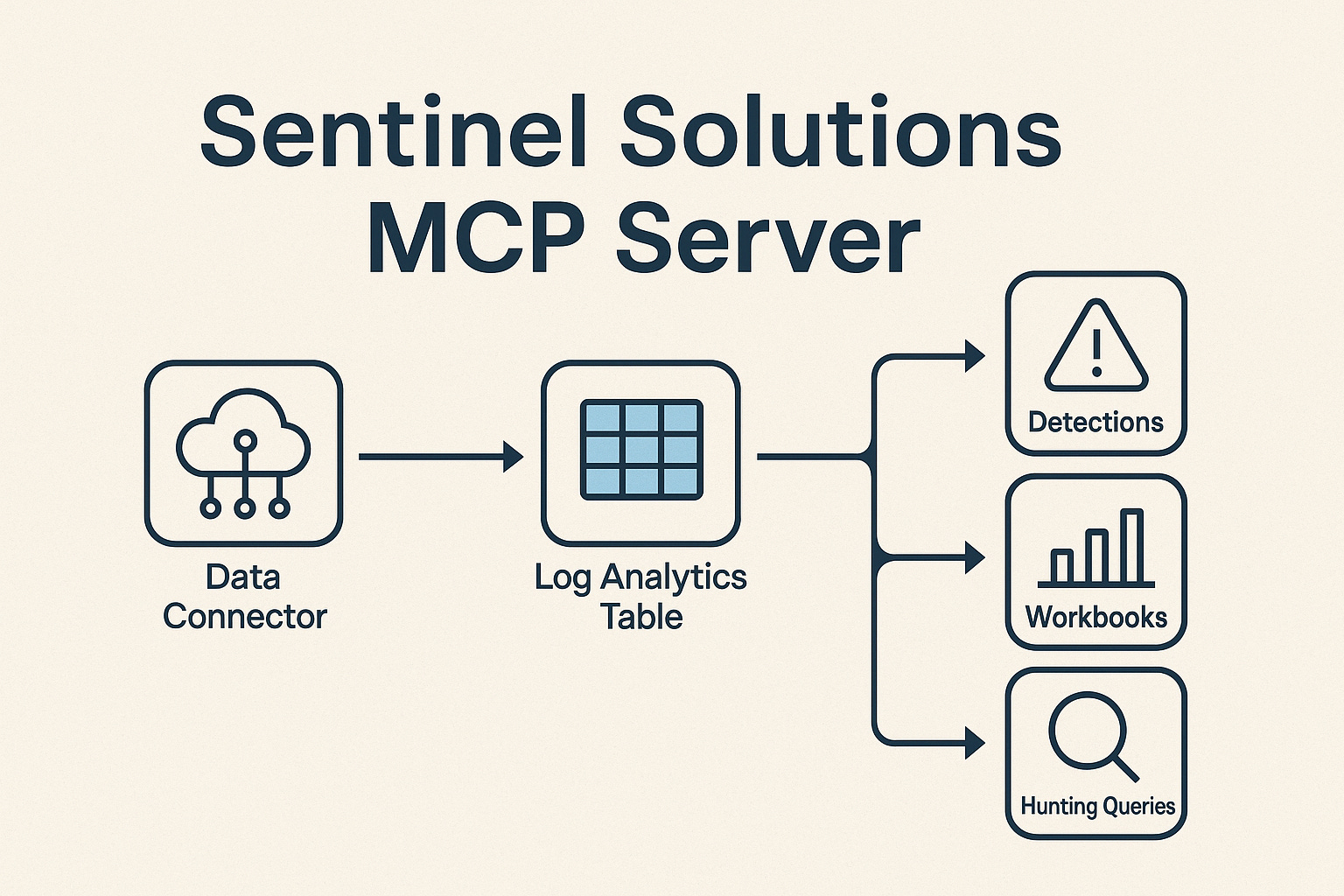
It acts as an MCP (Model Context Protocol) server that crawls Microsoft Sentinel solutions from any GitHub repository and maps data connectors → Log Analytics tables → content (detections, workbooks, hunting queries, parsers, playbooks, and more). It ships with a pre-built index of the entire Microsoft Sentinel Content Hub and can also target your own private/custom Sentinel solution repos. LobeHub+1
This post looks at why that matters so much for cost, design, and operations.
The core problem: Sentinel cost is driven by tables, not marketing labels
Most Sentinel conversations still begin with features and connectors:
“We’ll onboard Defender XDR, Office 365, Identity, etc.”
“We’ll deploy these out-of-the-box solutions from Content Hub.”
But Sentinel billing never heard of “solutions”. It only knows:
Which tables are receiving data
How much data per table
What retention, archive, and search you apply
That means any serious cost and design conversation has to be grounded in:
Connector → table → content mapping
Without that mapping, you are effectively guessing: (You can manually map!)
You switch on connectors because they “look useful”
Tables start ingesting large volumes of data
Only a portion of that data is referenced by any of your rules, hunting queries, workbooks, dashboards, or compliance reporting
The result is familiar:
Sentinel is perceived as “expensive”, but nobody can clearly say which data is worth it and which is not.
What the Sentinel Solutions MCP Server actually does
At a high level, the Sentinel Solutions MCP Server:
Reads Sentinel solutions from any GitHub repository (not just the official
Azure/Azure-Sentinel)Applies multiple resolution strategies (KQL parsing, ARM template analysis, connector metadata, parser resolution, and more) to identify which tables each connector writes to
Builds and ships a pre-built LLM-friendly index of the entire Microsoft Sentinel Content Hub, covering thousands of:
Solutions
Detections
Workbooks
Hunting queries
Playbooks
Parsers
Watchlists
Functions / ASIM content / summary rules / tools
Because it is implemented as an MCP server, an AI agent (or your Copilot-style workflow) can query it through well-defined tools such as:
analyze_solutions– full analysis with connector–table mappingsget_connector_tables– for a single connector, list all associated tableslist_data_connectors,list_detections,list_workbooks,list_parsers, etc. – to explore the content landscape
All of this can be done against:
The official Content Hub
Your forked Content Hub (e.g., for testing changes)
Your own internal Sentinel solutions repo (customer-specific, industry packs, MSSP content) LobeHub+1
In other words, it gives you a machine-readable map of how your content relates to your data.
Why this matters for cost optimisation
1. Stop paying for unused or underused data
With connector–table mapping in place, you can finally answer:
Which tables have high ingestion volume but no active detections using them?
Which connectors are feeding tables that only support legacy or rarely used content?
Where are we keeping data hot in Analytics that is only ever needed for long-term investigations or compliance?
From there, you can:
Decommission or down-scope connectors that do not justify their cost
Move certain tables to Basic or Archive where appropriate
Standardise on a smaller number of strategic connectors for each domain (identity, email, endpoint, SaaS, etc.)
This is not “optimisation by guesswork” – it is optimisation driven by a clear dependency map.
2. Make cost decisions as risk decisions
The dangerous way to cut Sentinel cost is to blindly disable connectors or reduce retention.
The safer way is:
Use the MCP server to map:
Connector → tables → detections / hunting / workbooks / ASIM contentFor each proposed change, produce a clear impact statement:
“We will lose N detections of severity X–Y”
“We will drop visibility on these specific threat scenarios”
“These workbooks/dashboards will have gaps”
Now cost tuning becomes a risk trade-off that can be explained, reviewed, and signed off by security and risk owners, rather than quietly flipping switches in the portal.
Why it matters for service design and productisation
For an MSSP, central platform team, or security architecture function, this mapping is fundamental.
1. Designing Sentinel-based service tiers with real numbers
If you want to build repeatable Sentinel offerings (Core XDR, Premium MDR, OT Add-on, etc.), you need to know:
Which solutions you include in each tier
Which connectors those solutions require
Which tables those connectors populate
What the approximate ingestion footprint is likely to be
By querying the MCP server against the official Content Hub plus your custom solutions repository, you can design your packages based on actual mappings, not assumption:
“Our Core package requires these connectors and these tables. Here is what we monitor and what it roughly costs.”
“Our Advanced package adds these additional solutions and tables, with a predictable increase in ingestion.”
That directly improves:
Pricing accuracy
Margin predictability
The quality of your sales narratives (“Here is exactly what we turn on for you and why it costs what it does”).
2. Repeatable onboarding and migration
Connector–table mapping also underpins repeatable onboarding:
For each new client, you can have standardised blueprints:
“For this industry pattern, we enable these solutions → these connectors → these tables.”
You can more easily compare tenants:
“Customer A and B are on the same service tier, but B is ingesting 40% more data from the same tables – why?”
When you integrate this MCP server into your internal toolchain or AI assistants, those comparisons become trivial queries instead of days of manual KQL and JSON spelunking.
Why exposing this via MCP is a step-change
The choice to implement this as an MCP server is not just a packaging detail. It is strategic. Any MSSP or engineering team should be building some sort of industrialised cross-tenant way to analyse all client environments.
MCP gives you:
Standardised tools that any compliant AI agent can call
The ability to embed this knowledge into:
Copilot-like assistants for your SOC
Internal automation that checks whether a proposed tuning change will break content
Design assistants that help architects explore solution impact
You move from:
Humans manually grepping GitHub and YAML files
to:
“Show me all Sentinel solutions in our repo that rely on tables from the Office 365 connector, and list the detections that would be impacted if we reduced retention on those tables.”
That is a very different operating model.
Practical uses you can try immediately
Once you have the Sentinel Solutions MCP Server wired into your environment, there are some immediate, high-value use cases:
Build a Connector–Table–Content Catalogue
Generate an internal catalogue that shows, per connector:Tables produced
Linked detections (with MITRE mappings)
Linked workbooks and hunting queries
Use it as a reference in architecture reviews and cost boards.
Pre-flight checks before enabling new solutions
Before you deploy a new Content Hub solution:Query which tables will be used
Estimate ingest impact
Confirm there is a clear detection and reporting benefit
Cost optimisation sprints
Run targeted campaigns to identify:High-volume tables with low or no content usage
Legacy connectors that can be retired or replaced
Opportunities to move data to cheaper tiers without losing essential coverage
Service tier definitions for an MSSP
Use the mapping to:Define exactly which solutions and connectors belong in each service SKU
Attach estimated ingestion ranges per SKU
Create transparent, repeatable designs instead of one-off, hand-crafted deployments
Closing thoughts
Sentinel has always promised rich, integrated security telemetry across Microsoft and beyond. The downside is that without discipline, it is easy to end up with a sprawl of connectors, overlapping data, and unpredictable bills.
The Sentinel Solutions MCP Server gives you something that has been missing for a long time:
A programmatic, up-to-date map of how Sentinel solutions and connectors translate into tables and content.
A way to put that map in front of AI agents and architects so they can make informed decisions about coverage, cost, and design.
If you are serious about standardising on Microsoft Sentinel—whether as an enterprise or an MSSP—this kind of connector–table insight is no longer a nice-to-have. It is the foundation for:
Sustainable cost optimisation
Credible service design
Safe, explainable tuning decisions
In short, it is the difference between “we turned on some connectors” and “we know exactly what we are collecting, why it matters, and what it costs.”
#MicrosoftSecurity
#MicrosoftLearn
#CyberSecurity
#MicrosoftSecurityCopilot
#Microsoft
#MSPartnerUK
#msftadvocate
Solid breakdown on how table-level visibility changes the whole Sentinel cost conversation. The bit about moving from guesswork to dependency maps is huge, especially when MSSPs need to justify evry dollar to clients. One thing I'm curios about is how organizations handle the political side once they map everything and realize half thier detections rely on barely-used tables with massve ingestion.
This is a better post than what I had planned on my on blog, thanks for the shout out!